
Aircraft support · MSFS 2024 · Free
Fenix A320 family in FlightFabric: voice commands, cockpit controls and live data
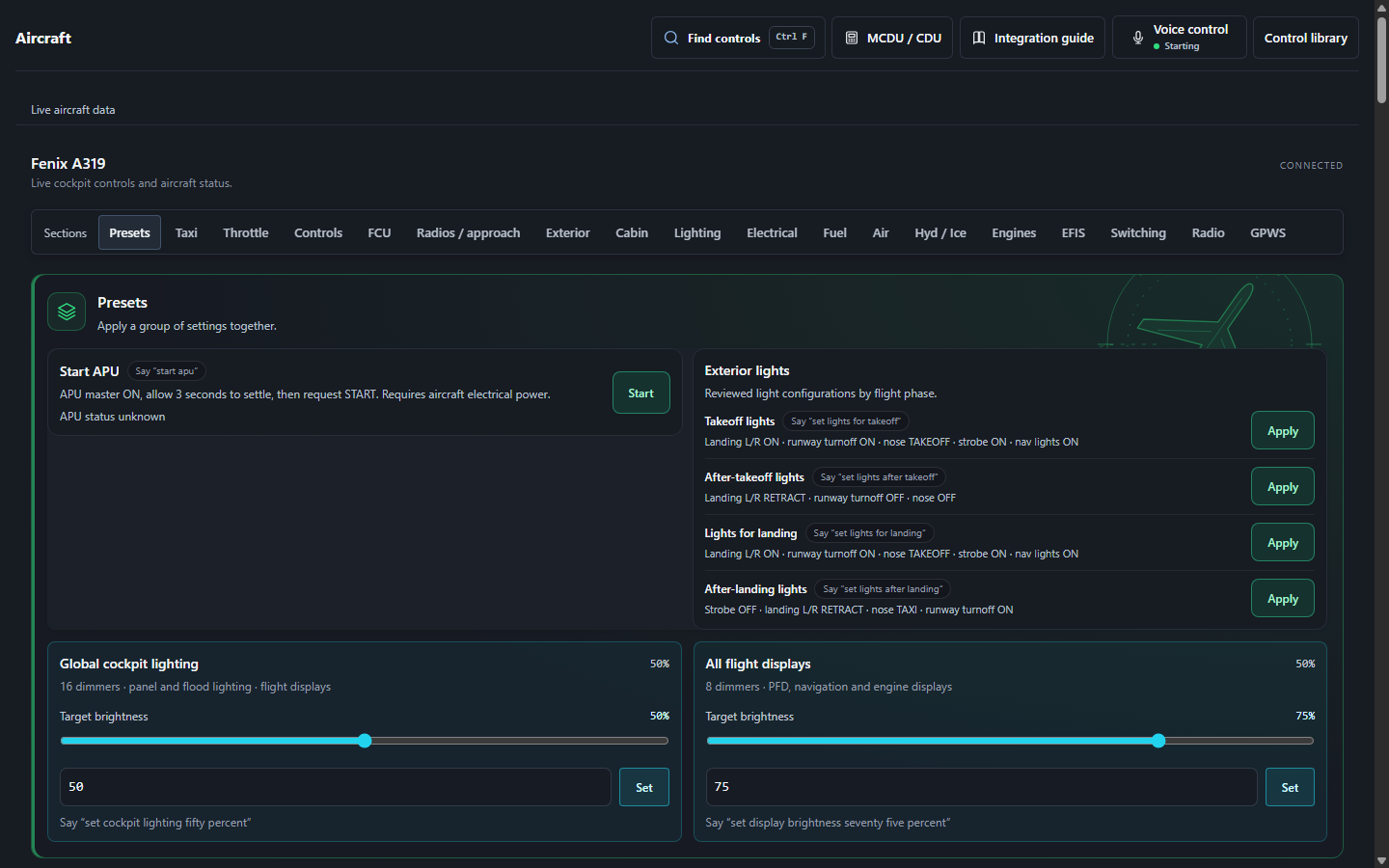
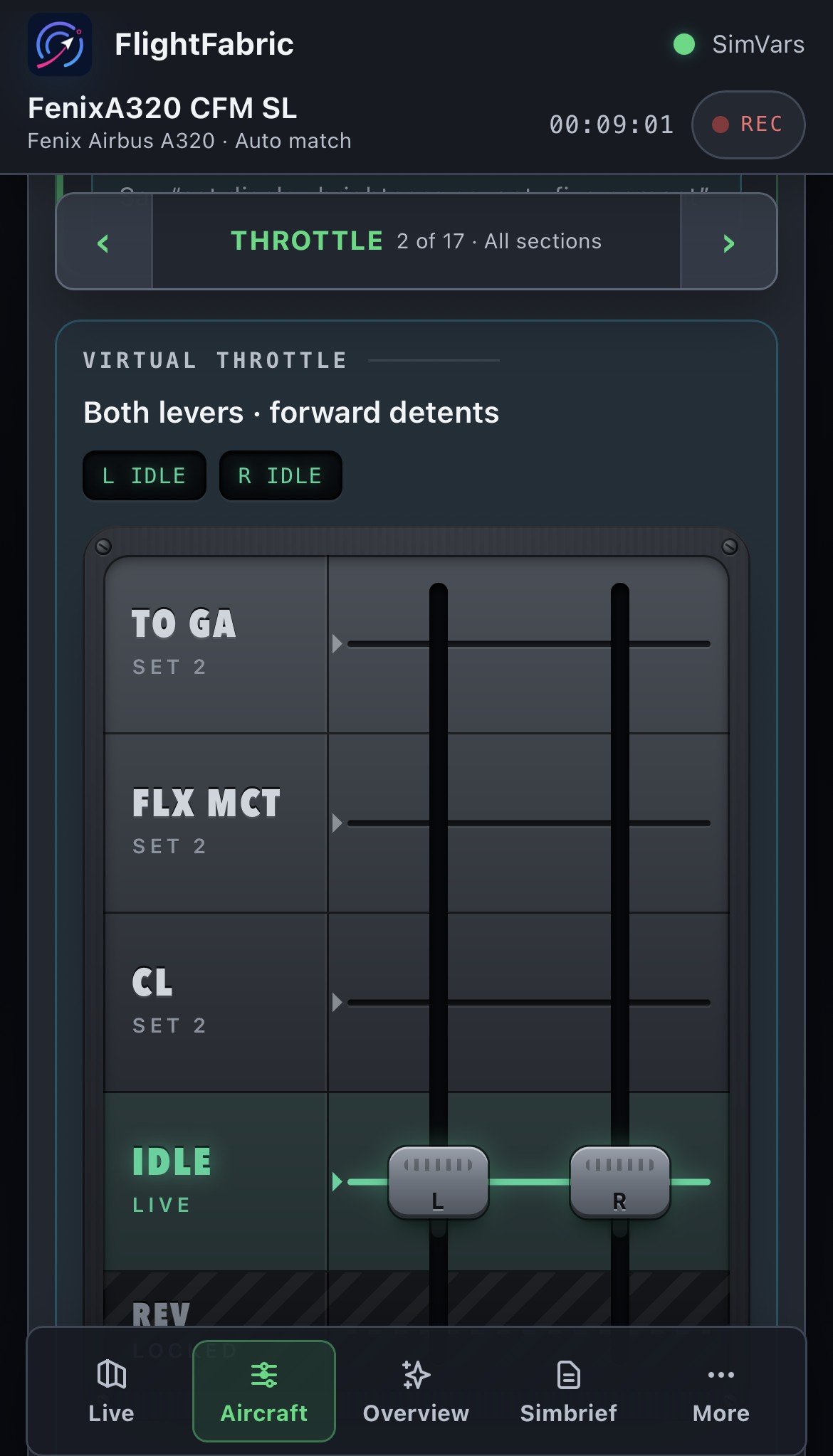
Call out a switch and watch it move, tap the same controls on a phone or tablet beside you, and see the cockpit state read back from the aircraft. This page lists everything FlightFabric 0.10.2 can do with the Fenix A320 family, taken from the app’s own catalogue.
- 3Variants covered
- 77Voice commands
- 7Presets
- 327Cockpit controls
- 161Live cockpit values
Aircraft covered
Load any of these in MSFS 2024 and FlightFabric switches to its cockpit layout and control set by itself. There is nothing to configure in the app.
- Fenix Airbus A319
- Fenix Airbus A320
- Fenix Airbus A321
Vendor: Fenix Simulations. Other A32x products from other developers are not covered by this page.
Its Aircraft page describes the integration as “Live cockpit controls and aircraft status.”
What you need
- FlightFabric 0.10.2 on the Windows PC that runs Microsoft Flight Simulator 2024, with one of the aircraft installed. MSFS and the aircraft are separate products; FlightFabric is free and needs no account.
- Some controls use the separately installed MobiFlight Event Module, enabled in MSFS 2024 My Library. Aircraft data stays viewable without it; the affected controls, marked below, stay disabled until it is detected.
- Voice control is optional and runs offline in the desktop app; the voice-control guide covers microphone and push-to-talk setup in five steps.
Try saying
Hold push-to-talk, say one of these, and release. Numbers are spoken as digits, so 270 is “two seven zero”. Each phrase below is accepted by FlightFabric 0.10.2 for the Fenix A320 family.
Every command
The full list, grouped by cockpit system. Every control here is also available from the Aircraft page and its control library, so you can tap it on a tablet instead of saying it. Setting a target such as a heading does not engage the autopilot; the aircraft’s current mode decides how it uses the target.
Flight guidance
| Control | Say | Value |
|---|---|---|
| Selected MachUses the MobiFlight Event Module. | “set mach value”or 1 other phrasing | 0.4–0.99 Mach · step 0.01 |
| Selected altitudeUses the MobiFlight Event Module. | “set altitude value”or 3 other phrasings | 0–49,000 ft · step 100 |
| Selected vertical speedUses the MobiFlight Event Module. | “set vertical speed value”or 1 other phrasing | -6,000–6,000 ft/min · step 100 |
| Selected flight path angleUses the MobiFlight Event Module. | “set flight path angle value”or 5 other phrasings | -9.9–9.9 deg · step 0.1 |
| Selected speedUses the MobiFlight Event Module. | “set speed value”or 1 other phrasing | 100–399 kt · step 1 |
| Selected headingUses the MobiFlight Event Module. | “set heading value”or 1 other phrasing | 0–359 deg · step 1 |
| Selected altitude (100-foot mode)Set the FCU altitude while its increment selector is in the 100-foot position. Uses the MobiFlight Event Module. | “set altitude value in hundreds”or 3 other phrasings | 0–49,000 ft · step 100 |
| Selected altitude (1,000-foot mode)Set the FCU altitude while its increment selector is in the 1,000-foot position. Uses the MobiFlight Event Module. | “set altitude value in thousands”or 3 other phrasings | 0–49,000 ft · step 1000 |
| Autopilot 1Uses the MobiFlight Event Module. | “autopilot one value”or 3 other phrasings | On / off |
| Autopilot 2Uses the MobiFlight Event Module. | “autopilot two value”or 3 other phrasings | On / off |
| AutothrustUses the MobiFlight Event Module. | “autothrust value”or 3 other phrasings | On / off |
| Localizer modeUses the MobiFlight Event Module. | “localizer value”or 1 other phrasing | On / off |
| Approach modeUses the MobiFlight Event Module. | “approach mode value”or 2 other phrasings | On / off |
| Expedite modeUses the MobiFlight Event Module. | “expedite value”or 1 other phrasing | On / off |
| Speed guidance modeUses the MobiFlight Event Module. | “set speed mode value”or 1 other phrasing | selected · managed |
| Heading guidance modeUses the MobiFlight Event Module. | “set heading mode value”or 1 other phrasing | selected · managed |
| Altitude guidance modeUses the MobiFlight Event Module. | “set altitude mode value”or 1 other phrasing | selected · managed |
Transponder and surveillance
| Control | Say | Value |
|---|---|---|
| Squawk | “squawk value”or 3 other phrasings | Four digits, each 0–7 |
| IDENTUses the MobiFlight Event Module. | “ident”or 2 other phrasings | One action |
Altimeters
| Control | Say | Value |
|---|---|---|
| Captain QNH (hPa)Uses the MobiFlight Event Module. | “captain qnh value”or 4 other phrasings | 948–1,084 hpa · step 1 |
| Captain QNH (inHg)Uses the MobiFlight Event Module. | “captain qnh value”or 4 other phrasings | 27.99–32.01 inhg · step 0.01 |
| Captain standard pressureUses the MobiFlight Event Module. | “captain standard pressure”or 7 other phrasings | One action |
| First officer QNH (hPa)Uses the MobiFlight Event Module. | “first officer qnh value”or 4 other phrasings | 948–1,084 hpa · step 1 |
| First officer QNH (inHg)Uses the MobiFlight Event Module. | “first officer qnh value”or 4 other phrasings | 27.99–32.01 inhg · step 0.01 |
| First officer standard pressureUses the MobiFlight Event Module. | “first officer standard pressure”or 7 other phrasings | One action |
| Both QNH (hPa)Uses the MobiFlight Event Module. | “both qnh value”or 4 other phrasings | 948–1,084 hpa · step 1 |
| Both QNH (inHg)Uses the MobiFlight Event Module. | “both qnh value”or 4 other phrasings | 27.99–32.01 inhg · step 0.01 |
| Both standard pressureUses the MobiFlight Event Module. | “both standard pressure”or 13 other phrasings | One action |
Flight controls
| Control | Say | Value |
|---|---|---|
| Parking brake | “parking brake value”or 1 other phrasing | Set / release |
| Flap detent | “set flaps value”or 1 other phrasing | up · 1 · 2 · 3 · full |
| AutobrakeUses the MobiFlight Event Module. | “set autobrake value”or 5 other phrasings | off · disarm · low · medium · max |
| Spoilers | “spoilers value”or 7 other phrasings | retracted · half · full |
| Ground spoilers | “ground spoilers value”or 6 other phrasings | Arm / disarm |
Exterior lights
| Control | Say | Value |
|---|---|---|
| Beacon lights | “beacon lights value”or 7 other phrasings | On / off |
| Strobe lights | “strobe lights value”or 7 other phrasings | off · auto · on |
| Navigation and logo lights | “nav logo lights value”or 1 other phrasing | off · nav · logo |
| Nose light | “nose light value”or 1 other phrasing | off · taxi · takeoff |
| Landing lightsLeft and right landing lights; the nose-light selector is separate. | “landing lights value”or 9 other phrasings | On / off |
| Left landing lights | “left landing lights value”or 7 other phrasings | On / off |
| Right landing lights | “right landing lights value”or 7 other phrasings | On / off |
| Taxi lightsUses the shared nose-light selector: TAXI or OFF. | “taxi lights value”or 9 other phrasings | On / off |
| Runway turnoff lights | “runway turnoff lights value”or 19 other phrasings | On / off |
| Wing lights | “wing lights value”or 1 other phrasing | On / off |
Engines and thrust
| Control | Say | Value |
|---|---|---|
| Throttle detent | “set throttles value”or 2 other phrasings | idle · climb · flex · toga |
Aircraft systems
| Control | Say | Value |
|---|---|---|
| APU master | “apu master value”or 1 other phrasing | On / off |
| APU bleed | “apu bleed value”or 1 other phrasing | off · on |
| Wing anti ice | “wing anti ice value”or 1 other phrasing | off · on |
| Probe heat | “probe heat value”or 3 other phrasings | auto · on |
| Cross bleed | “cross bleed value”or 3 other phrasings | closed · auto · open |
| Pack flow | “pack flow value”or 1 other phrasing | low · normal · high |
| Ram air | “ram air value”or 1 other phrasing | On / off |
| Brake fans | “brake fans value”or 1 other phrasing | On / off |
| Engine 1 anti ice | “engine one anti ice value”or 3 other phrasings | off · on |
| Engine 1 bleed | “engine one bleed value”or 3 other phrasings | off · on |
| Pack 1 | “pack one value”or 3 other phrasings | off · on |
| Battery 1 | “battery one value”or 3 other phrasings | off · auto |
| Engine 2 anti ice | “engine two anti ice value”or 3 other phrasings | off · on |
| Engine 2 bleed | “engine two bleed value”or 3 other phrasings | off · on |
| Pack 2 | “pack two value”or 3 other phrasings | off · on |
| Battery 2 | “battery two value”or 3 other phrasings | off · auto |
| APU generator | “apu generator value”or 1 other phrasing | On / off |
Cabin signs
| Control | Say | Value |
|---|---|---|
| Seat belts | “seat belts value”or 5 other phrasings | off · on |
| No smoking signs | “no smoking value”or 3 other phrasings | off · auto · on |
| Emergency lights | “emergency lights value”or 3 other phrasings | off · arm · on |
Wipers and visibility
| Control | Say | Value |
|---|---|---|
| Captain wiper | “captain wiper value”or 1 other phrasing | off · slow · fast |
| First officer wiper | “first officer wiper value”or 1 other phrasing | off · slow · fast |
Navigation
| Control | Say | Value |
|---|---|---|
| Captain ND range | “captain range value”or 2 other phrasings | 10 · 20 · 40 · 80 · 160 · 320 |
| Captain LSUses the MobiFlight Event Module. | “captain ls value”or 3 other phrasings | On / off |
| First officer ND range | “first officer range value”or 2 other phrasings | 10 · 20 · 40 · 80 · 160 · 320 |
| First officer LSUses the MobiFlight Event Module. | “first officer ls value”or 3 other phrasings | On / off |
Presets
A preset works through several switches in order and reports each step, the way a pilot monitoring runs a flow. It stops, rather than retrying, when the aircraft does not confirm a step.
Presets
| Control | Say | Value |
|---|---|---|
| Start APUAPU master ON, allow 3 seconds to settle, then request START. Requires aircraft electrical power. Uses the MobiFlight Event Module. | “start apu”or 7 other phrasings | One action |
| Takeoff lightsLanding L/R ON · runway turnoff ON · nose TAKEOFF · strobe ON · nav lights ON | “set lights for takeoff”or 7 other phrasings | One action |
| After-takeoff lightsLanding L/R RETRACT · runway turnoff OFF · nose OFF | “set lights after takeoff”or 10 other phrasings | One action |
| Lights for landingLanding L/R ON · runway turnoff ON · nose TAKEOFF · strobe ON · nav lights ON | “set lights for landing”or 5 other phrasings | One action |
| After-landing lightsStrobe OFF · landing L/R RETRACT · nose TAXI · runway turnoff ON | “set lights after landing”or 5 other phrasings | One action |
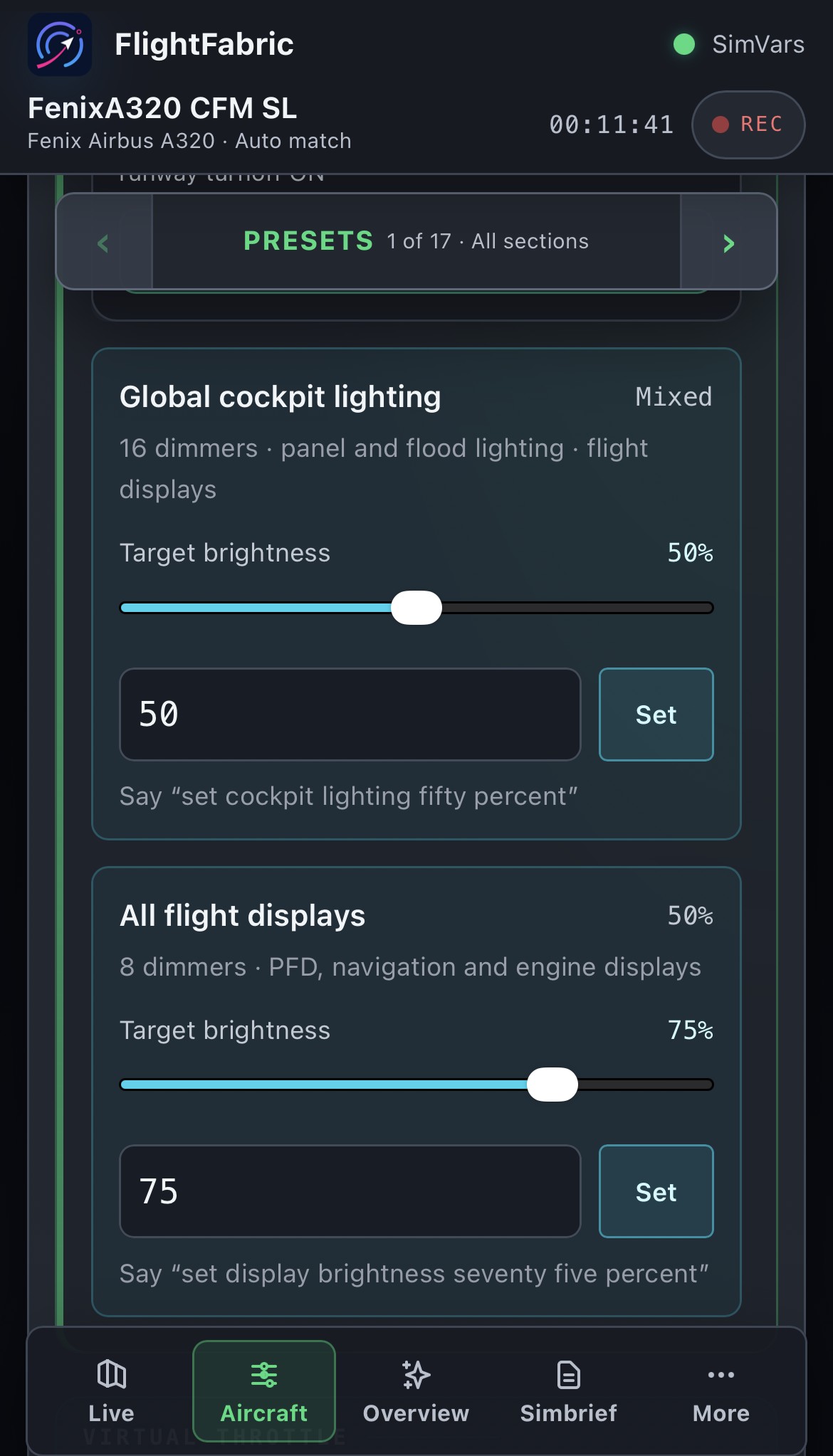
| Cockpit lighting16 dimmers · panel and flood lighting · flight displays | “set cockpit lighting value”or 2 other phrasings | 0–100 % · step 1 |
| Flight displays8 dimmers · PFD, navigation and engine displays | “set display brightness value”or 6 other phrasings | 0–100 % · step 1 |
More cockpit controls
Individual switches in the system sections of the Aircraft page, with the positions each one can be set to. The control library search finds them too.
Flight guidance 3
- Baro unit captain
- Baro unit first officer
- Altitude increment
Transponder and surveillance 10
- Rmp captain power
- Rmp first officer power
- Rmp third power
- Weather radar multiscan
- Weather radar pws
- Altitude reporting
- Weather radar system
- Transponder operation
- Transponder system
- Transponder mode
Cockpit lighting 3
- Fcu
- Overhead
- Pedestal
Fuel 9
- Left pump 1
- Left pump 2
- Right pump 1
- Right pump 2
- Center pump 1
- Center pump 2
- Crossfeed
- Mode
- Act transfer
Aircraft systems 27
- Commercial
- Galley and cabin
- Generator 1
- Generator 2
- Generator 1 line
- Ac ess feed
- Hydraulic engine pump 1
- Hydraulic engine pump 2
- Hydraulic ptu
- Hydraulic blue electric pump
- Hot air
- Pressurization
- Blower
- Extract
- Cabin fans
- Cargo hot air
- Cargo aft isolation
- Anti skid
- Engine manual start 1
- Engine manual start 2
- Engine N1 mode 1
- Engine N1 mode 2
- Ir 1
- Ir 2
- Ir 3
- Engine mode
- Clock utc
Navigation 4
- Navaid captain 1
- Navaid captain 2
- Navaid first officer 1
- Navaid first officer 2
Displays 7
- Ice standby
- Chart light captain
- Chart light first officer
- Dome light
- Annunciator
- Console floor captain
- Console floor first officer
Controls 1
- Cockpit door video
Safety 5
- GPWS system
- GPWS terrain
- GPWS glideslope
- GPWS flap mode
- GPWS landing flap 3
Switching 5
- Attitude heading
- Air data
- Eis dmc
- ECAM ND
- Audio
Live cockpit data
The Aircraft page shows these 161 values as the aircraft reports them, next to the controls that change them. What you see is the switch position in the cockpit, not what the app last asked for.
Flight guidance 18
- AP 1
- AP 2
- Approach
- Autothrust
- Expedite
- Localizer
- Speed managed
- Heading managed
- Altitude managed
- Speed value
- Heading deg
- Altitude ft
- Vertical value
- Mach mode
- Trk fpa mode
- Baro unit captain
- Baro unit first officer
- Altitude increment mode
Transponder and surveillance 13
- Rmp captain power
- Rmp first officer power
- Rmp third power
- Weather radar multiscan auto
- Weather radar pws auto
- Altitude reporting
- Weather radar system
- Transponder operation
- Transponder system
- Transponder mode
- Powered
- Squawk
- Transmitting
Altimeters 7
- Healthy
- Captain QNH
- Captain hpa
- Captain inhg
- First officer QNH
- First officer hpa
- First officer inhg
Exterior lights 8
- Beacon
- Runway turnoff
- Wing
- Landing left mode
- Landing right mode
- NAV logo mode
- Nose mode
- Strobe mode
Cockpit lighting 19
- Fcu
- Overhead
- Pedestal
- Fcu percent
- Fcu text percent
- Overhead percent
- Pedestal percent
- Main flood percent
- Pedestal flood percent
- Captain map percent
- First officer map percent
- Captain PFD percent
- Captain ND percent
- Captain weather percent
- First officer PFD percent
- First officer ND percent
- First officer weather percent
- Upper display percent
- Lower display percent
Engines and thrust 2
- Throttle lever 1 position
- Throttle lever 2 position
Fuel 9
- Left pump 1
- Left pump 2
- Right pump 1
- Right pump 2
- Center pump 1
- Center pump 2
- Crossfeed open
- Mode manual
- Act transfer
Aircraft systems 49
- APU bleed
- APU generator
- APU master
- APU master on
- APU master fault
- APU start
- APU available
- Battery 1
- Battery 2
- Commercial
- Galley and cabin
- Generator 1
- Generator 2
- Generator 1 line
- Ac ess feed alternate
- Hydraulic engine pump 1
- Hydraulic engine pump 2
- Hydraulic ptu
- Hydraulic blue electric pump
- Engine anti ice 1
- Engine anti ice 2
- Engine bleed 1
- Engine bleed 2
- Pack 1
- Pack 2
- Wing anti ice
- Ram air
- Hot air
- Probe heat
- Pressurization manual
- Blower
- Extract
- Cabin fans
- Cargo hot air
- Cargo aft isolation
- Brake fan
- Anti skid
- Parking brake
- Engine manual start 1
- Engine manual start 2
- Engine N1 mode 1
- Engine N1 mode 2
- Cross bleed mode
- Ir 1 mode
- Ir 2 mode
- Ir 3 mode
- Pack flow mode
- Engine mode
- Clock utc mode
Cabin signs 3
- Seat belts
- Emergency exit mode
- No smoking mode
Wipers and visibility 2
- Wiper captain mode
- Wiper first officer mode
Navigation 8
- Navaid captain 1
- Navaid captain 2
- Navaid first officer 1
- Navaid first officer 2
- Captain range
- Captain ls
- First officer range
- First officer ls
Displays 7
- Ice standby
- Chart light captain
- Chart light first officer
- Dome light mode
- Annunciator mode
- Console floor captain mode
- Console floor first officer mode
Controls 6
- Cockpit door video
- Flaps handle
- Speedbrake position
- Autobrake low
- Autobrake medium
- Autobrake max
Safety 5
- GPWS system off
- GPWS terrain off
- GPWS glideslope off
- GPWS flap mode off
- GPWS landing flap 3
Switching 5
- Attitude heading
- Air data
- Eis dmc
- ECAM ND
- Audio
Verification status
All 327 aircraft-specific controls on this page are mapped from the aircraft’s documented cockpit variables and events. The project has not yet confirmed them one by one in a live simulator session, so the app lists each of them as awaiting verification. That is a statement about the project’s own testing, not a known fault: wherever the aircraft exposes the switch state, the app reads it back before reporting success.
Every control is guarded the same way: FlightFabric sends it once, waits for the aircraft to report the new switch position, and shows a failure instead of retrying. A few momentary controls are confirmed only by the simulator accepting the command. If a control does not respond on your installation, please report it on GitHub with the aircraft version so it can be fixed.