
Aircraft support · MSFS 2024 · Free
Microsoft 737 MAX 8 in FlightFabric: limited controls and live data
This integration offers a smaller set of controls alongside live aircraft data. It is not on the homepage’s alpha support list. Testing is incomplete; start with the setup and limitations below.
Testing and limitations
The aircraft-specific controls are mapped from the aircraft’s documented cockpit variables and events. The project has not yet confirmed them one by one in a live simulator session. Treat this integration as something to try and help test; listing a control does not establish that it works in every variant or flight condition.
Check the result in the cockpit, even when the app reports success. Confirmation depends on the control and the data available from the aircraft. If something does not respond as expected, report it on GitHub with your aircraft and version.
Aircraft profiles
The app includes profiles for this aircraft. Inclusion does not mean every variant has been tested. Check that FlightFabric identifies your loaded aircraft correctly.
- Microsoft / Asobo Studio Boeing 737 MAX 8
Vendor: Microsoft / Asobo Studio. Other Boeing 737 MAX 8 products from other developers are not covered by this page.
What you need
- FlightFabric 0.13.2 on the Windows PC that runs Microsoft Flight Simulator 2024, with the aircraft installed. MSFS and the aircraft are separate products; FlightFabric is free and needs no account.
- Voice control is optional and runs offline in the desktop app; the voice-control guide covers microphone and push-to-talk setup in five steps.
Try saying
These examples match phrases in the app’s command catalogue. Recognition and the aircraft’s response still need checking on your setup. Hold push-to-talk, speak, release, then check the result in the cockpit. Numbers are spoken as digits, so 270 is “two seven zero”.
Browse the app catalogue and preview
These entries describe the app’s intended controls and data. They are generated from its catalogue, and listing an entry does not confirm it has been tested on your setup.
How the app labels it: Standard controls
Its Aircraft page describes the integration as “Compact MCP, standard guidance, exterior-light and flight-configuration controls with live readback.”
When connected it reports: “Controls ready. AP MASTER and mode commands are generic simulator controls; they do not represent Boeing CMD A/B channel selection. A/T active, runway-turnoff, speedbrake and deep systems remain read-only.”
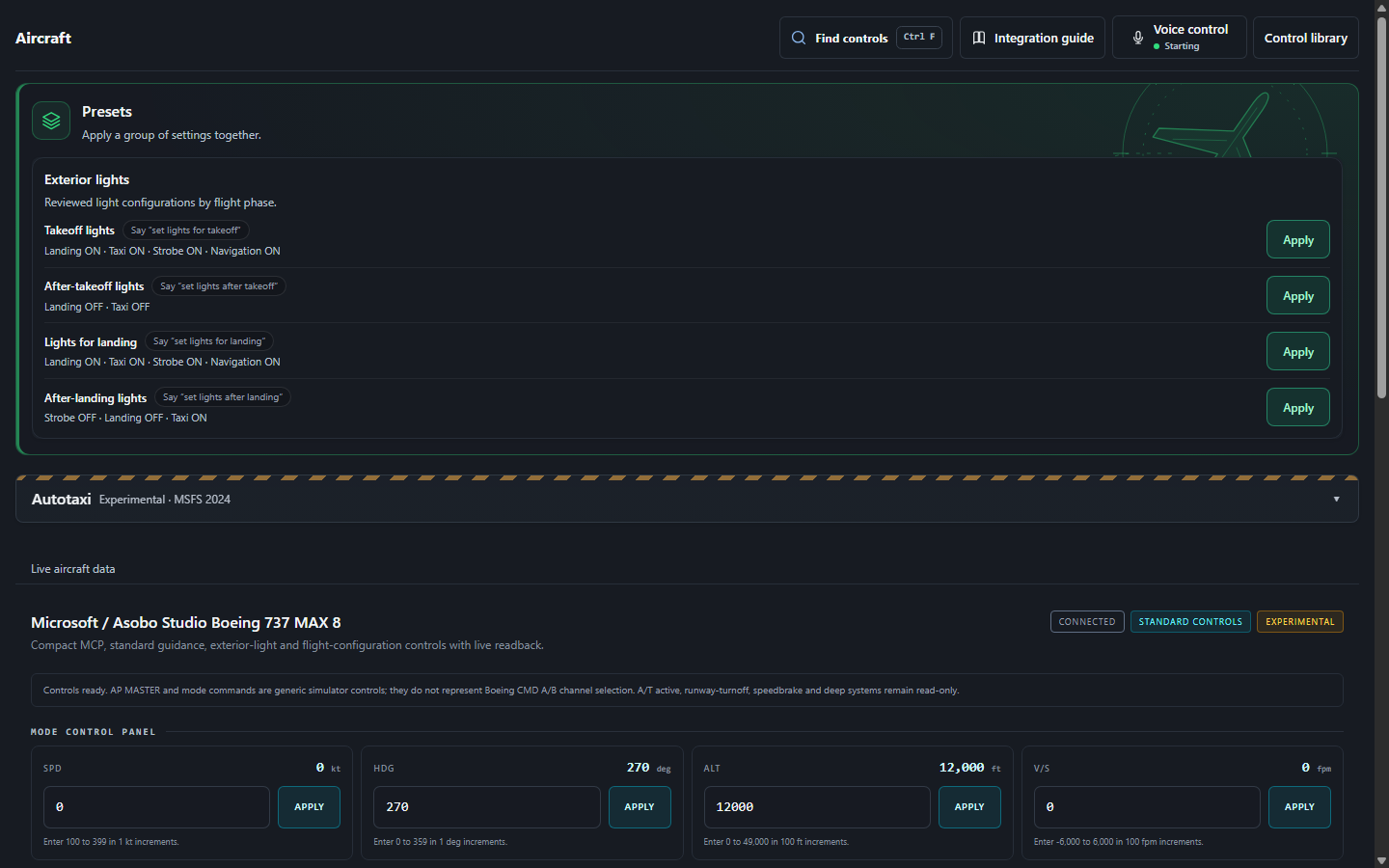
Command mappings
Commands listed by the app, grouped by cockpit system. Descriptions state the intended action; they do not establish a successful simulator test. Check current availability in the Aircraft page or Control library. Setting a heading or altitude target does not engage the autopilot.
Flight guidance
| Control | Say | Value |
|---|---|---|
| Selected heading | “set heading value”or 1 other phrasing | 0–359 deg · step 1 |
| Selected altitude | “set altitude value”or 3 other phrasings | 0–49,000 ft · step 100 |
| Selected speed | “set speed value”or 1 other phrasing | 100–399 kt · step 1 |
| Selected vertical speed | “set vertical speed value”or 1 other phrasing | -6,000–6,000 ft/min · step 100 |
| Autopilot master | “autopilot value” | On / off |
| Speed hold | “speed hold value”or 1 other phrasing | On / off |
| Heading hold | “heading hold value” | On / off |
| Altitude hold | “altitude hold value” | On / off |
| Vertical speed mode | “vertical speed mode value” | On / off |
| Flight level change | “flight level change value” | On / off |
| Approach mode | “approach mode value”or 2 other phrasings | On / off |
| Flight director | “flight director value”or 1 other phrasing | On / off |
| Autothrottle arm | “autothrottle arm value”or 1 other phrasing | On / off |
| NAV hold | “nav hold value”or 1 other phrasing | On / off |
Flight controls
| Control | Say | Value |
|---|---|---|
| Landing gear | “gear value”or 1 other phrasing | up · down |
| Flaps one detent | “flaps value one”or 1 other phrasing | increase · decrease |
| Parking brake | “parking brake value”or 1 other phrasing | Set / release |
Exterior lights
| Control | Say | Value |
|---|---|---|
| Nav lights | “nav lights value”or 7 other phrasings | On / off |
| Beacon lights | “beacon lights value”or 7 other phrasings | On / off |
| Strobe lights | “strobe lights value”or 7 other phrasings | On / off |
| Landing lights | “landing lights value”or 9 other phrasings | On / off |
| Taxi lights | “taxi lights value”or 9 other phrasings | On / off |
| Wing lights | “wing lights value”or 1 other phrasing | On / off |
| Logo lights | “logo lights value”or 1 other phrasing | On / off |
Presets
Presets group several intended switch changes. Testing an individual switch does not establish that the whole preset works in every situation. Review its settings and check the result in the cockpit.
Presets
| Control | Say | Value |
|---|---|---|
| Takeoff lightsLanding ON · Taxi ON · Navigation and strobe ON | “set lights for takeoff”or 8 other phrasings | One action |
| After-takeoff lightsLanding OFF · Taxi OFF | “set lights after takeoff”or 10 other phrasings | One action |
| Lights for landingLanding ON · Taxi ON · Navigation and strobe ON | “set lights for landing”or 5 other phrasings | One action |
| After-landing lightsNavigation ON · Strobe OFF · Landing OFF · Taxi ON | “set lights after landing”or 5 other phrasings | One action |
Live cockpit data
Values listed in the app’s aircraft profile. Coverage, freshness and accuracy depend on the aircraft and connection; not every value has been checked in every variant or flight condition.
Mode control panel 4
- Speed kts
- Heading deg
- Altitude ft
- Vertical speed fpm
Autoflight and flight directors 11
- AP master
- Flight director
- Autothrottle active
- Autothrottle armed
- Speed
- Heading select
- LNAV
- Altitude hold
- Vertical speed
- Level change
- Approach
Exterior lights 10
- Strobe
- Beacon
- NAV
- Logo
- Wing
- Landing
- Landing left
- Landing right
- Taxi
- Runway turnoff
Aircraft systems 12
- Engine 1 N1
- Engine 2 N1
- Engine 1 running
- Engine 2 running
- Fuel total pct
- Fuel total weight lbs
- Gross weight lbs
- Cabin altitude ft
- Cabin vertical speed fpm
- Cabin delta pressure psi
- Outside air temperature C
- Mach
Controls 9
- Flaps percent
- Flaps index
- Flap angle deg
- Speedbrake percent
- Gear handle down
- Gear nose pct
- Gear left pct
- Gear right pct
- Parking brake